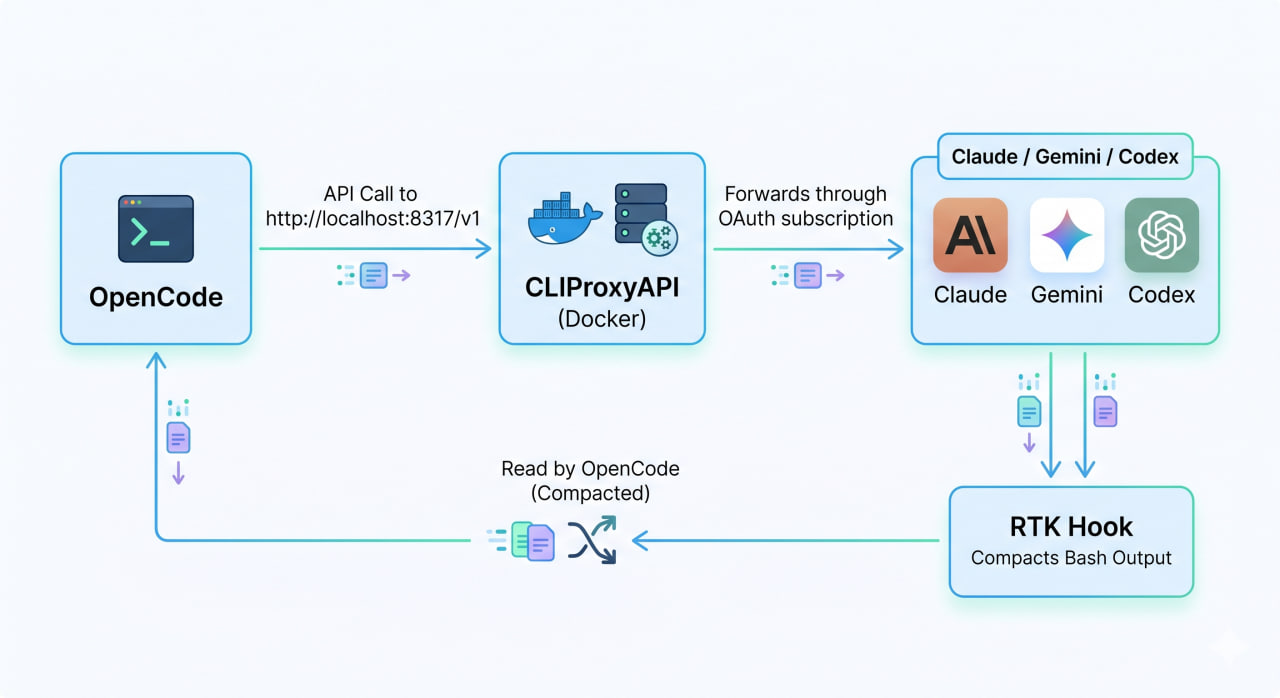
This guide shows how to connect OpenCode to a local CLIProxyAPI instance running in Docker and use RTK to compact bash output before OpenCode reads it.
Overview Flow OpenCode -> API call to http://localhost:8317/v1 CLIProxyAPI (Docker) -> forwards through OAuth subscription Claude / Gemini / Codex <- RTK hook compacts bash output before OpenCode reads it Step 1: Check That CLIProxyAPI Docker Is Running docker ps | grep cliproxy # Quick test curl http://localhost:8317/v1/models | jq # If you mapped a different port, replace 8317 accordingly.
Trên Debian, khi cài đặt một gói cần thiết nào đó, ví dụ như linux-header cho Wireguard, có thể bạn sẽ nhận được thông báo lỗi tương tự như sau:
# apt install linux-headers-$(uname -r)
Reading package lists... Done
Building dependency tree
Reading state information... Done
E: Unable to locate package linux-headers-4.19.0-11-cloud-amd64
E: Couldn't find any package by glob 'linux-headers-4.19.0-11-cloud-amd64'
E: Couldn't find any package by regex 'linux-headers-4.19.0-11-cloud-amd64'
Không tìm thấy gói cài đặt!
Cloudflare là dịch vụ DNS trung gian miễn phí có hỗ trợ CDN (Cloud Delivery Network), giúp điều phối lượng truy cập giữa máy chủ và máy khách thông qua máy chủ trung gian (proxy) của CloudFlare. Ngoài ra Cloudflare cung cấp nhiều thiết lập miễn phí nên rất nhiều webmaster sử dụng.
Bài viết này hướng dẫn bạn kích hoạt chứng chỉ SSL miễn phí của Cloudflare ở mức cao nhất Full (Strict) cho web server sử dụng WordPress, Drupal… Bạn có thể chọn một khoảng thời gian có hiệu lực của chứng chỉ SSL dài lên đến 15 năm cho tên miền chính và bao gồm tất cả các tên miền phụ bằng cách sử dụng ký tự đại diện *.
To run a WordPress website, you need a server with the required services pre-installed. A low-cost VPS is usually enough for small or new sites, and Debian 12 (Bookworm) is a solid base for a lightweight LEMP stack.
This guide uses the root user. If you want to run commands with a normal user (for example debian), run the following first as root:
usermod -aG sudo username exec su -l username Replace username with your actual account name.