Understanding the OSI Model
The OSI (Open Systems Interconnection Reference Model) uses layers to visually describe what is happening with a specific network system.
Basically, the OSI model has the following features:
-
It makes it easy for us to visualize the big picture of the network and understand how computer networks basically work.
-
Through the OSI model, we can understand how hardware and software work together.
-
It helps network administrators narrow down problems when there are network issues by separating layers.
-
It helps us understand new technologies as they are developed.
-
The OSI model is one of the most important tools to help you understand how network devices like routers and switches work (switches work at layer 2, routers work at layer 3)…
-
You can use the OSI model to compare basic relationships on different networks
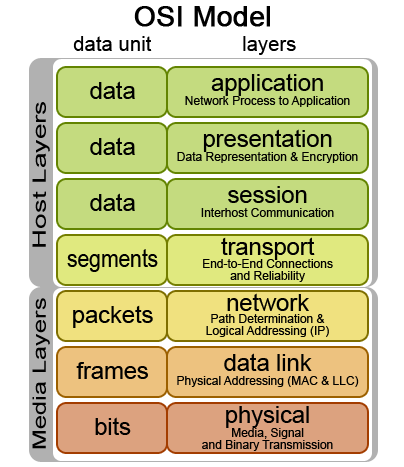
Let me take an example of sending a letter in real life to describe the OSI model. Typically, to send a letter you must perform the following steps sequentially:
1. Write a letter
2. Insert it into an envelope
3. Write the sender and recipient information on the envelope
4. Attach a stamp to it
5. Go to the post office and drop it in a mailbox
From the example above, we see that we must go through several steps in a specific order to complete a task. Similarly, that’s how two computers communicate with each other. They must use a predetermined model, specifically the OSI model, to complete each step. There are 7 steps in this model as listed below:
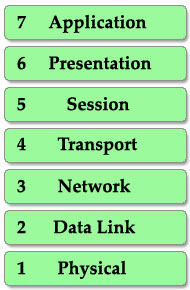
A common way to remember the order from top to bottom of the OSI model is to create a mnemonic sentence starting with the first letters of these layers: Please Do Not Throw Sausage Pizza Away (or All People Seem To Need Data Processing).
When a device wants to send information to another device, its data must go from the top layer to the bottom layer. But when a device receives this information, it must go from bottom to top to “decapsulate (unpackage)”. In practice, the reverse actions at the other end are very natural in our lives. It’s similar to when two people communicate via mail. First, the writer has to write the letter and insert it into an envelope, while the recipient first has to open the envelope and then read the letter. The images below show the complete process of sending and receiving information.
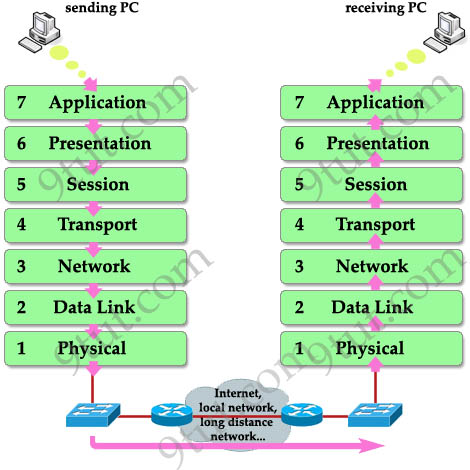
Note: The layers in the OSI model are usually called by number rather than name (for example, we usually call “layer 3” instead of “network layer”), so it’s best you remember the order of each layer in the OSI model.
When information goes down through the layers (from top to bottom), a header is added to it. This is called encapsulation because it’s like wrapping an object in a capsule. Each header can be understood by the corresponding layers on the receiving side. Other layers only see the header of that layer as part of the data.
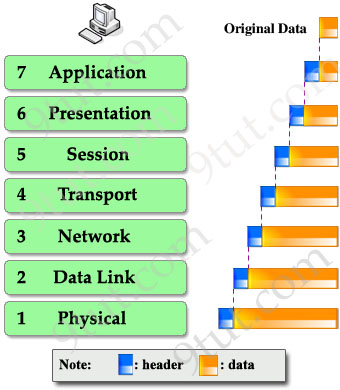
On the receiving end, at each layer the corresponding header is separated before being passed up to the layer above to continue processing.
Understanding Each Layer
Layer 7 - Application Layer
In the OSI model, this is the layer closest to the end user. Applications working at layer 7 are applications that users interact with directly. Web browsers (Google Chrome, Firefox, Safari, etc.) or applications like Skype, Outlook, Office are examples of layer 7 - the application layer.
It is the top layer and is responsible for providing services to end users.
-
Allows users (whether people or software) to access the network.
-
It provides user interface and support for services such as email, remote access and file transfer, shared data management, etc…
-
Processes data (information) in various ways
Layer 6 - Presentation Layer
This layer ensures data presentation, which means the information transmitted through this layer is in appropriate forms for the recipient. Generally, it acts as a translator for the network. For example, you want to send an email and the presentation layer will format your data into email format. Or you want to send a picture to your friends, the Presentation layer will format your data into GIF, JPG or PNG formats…
Layer 5 - Session Layer
The task of layer 5 is to establish, maintain, and terminate communication with receiving devices.
Layer 4 - Transport Layer
This layer maintains control of the data flow and performs error checking and data recovery between devices. The most common examples of the transport layer are Transmission Control Protocol (TCP) and User Datagram Protocol (UDP).
Layer 3 - Network Layer
This layer provides logical addressing that routers will use to determine the path to the destination. In most cases, logical addressing here means IP addresses (including source & destination IP addresses).
Layer 2 - Data Link Layer
The data link layer formats messages into data frames and adds to it a header containing the hardware addresses of the receiving end and its source address. This header is responsible for finding the next destination device on an internal network.
Note that layer 3 is responsible for finding the path to the final destination (network) but it doesn’t care about who will be the next recipient. So layer 2 helps the data reach the next destination.
This layer is subdivided into 2 sublayers: logical link control (LLC) and media access control (MAC).
The LLC functions include:
- Manage frames for layers above and below
- Error control
- Flow control
The MAC sublayer carries the physical address of each device on the network. This address is usually called the device’s MAC address. The MAC address is a 48-bit address written into the NIC on the manufacturer’s device.
Layer 1 - Physical Layer
The physical layer defines the physical characteristics of the network such as connections, voltage levels, and timing.
To help you remember the functions of each layer more easily, I created an interesting story in which Henry (English) wants to send a document to Charles (French) to demonstrate how the OSI model works.
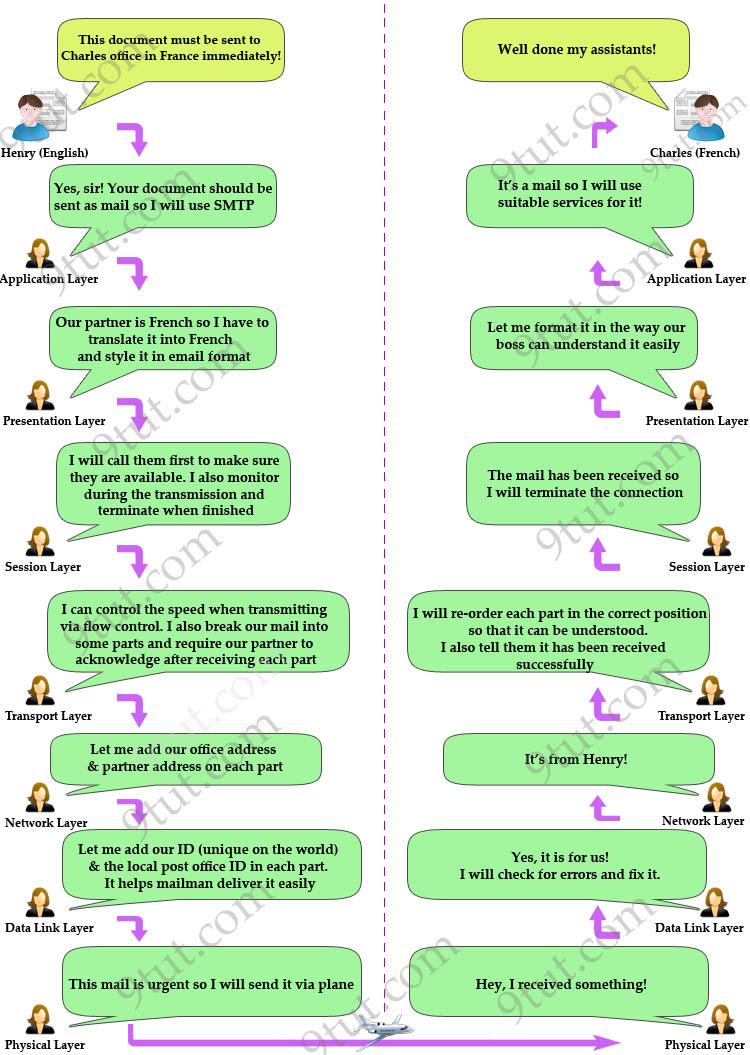
Finally, I summarize all the important functions of each layer in the table below (please remember them, these are very important knowledge you need to know about the OSI model):
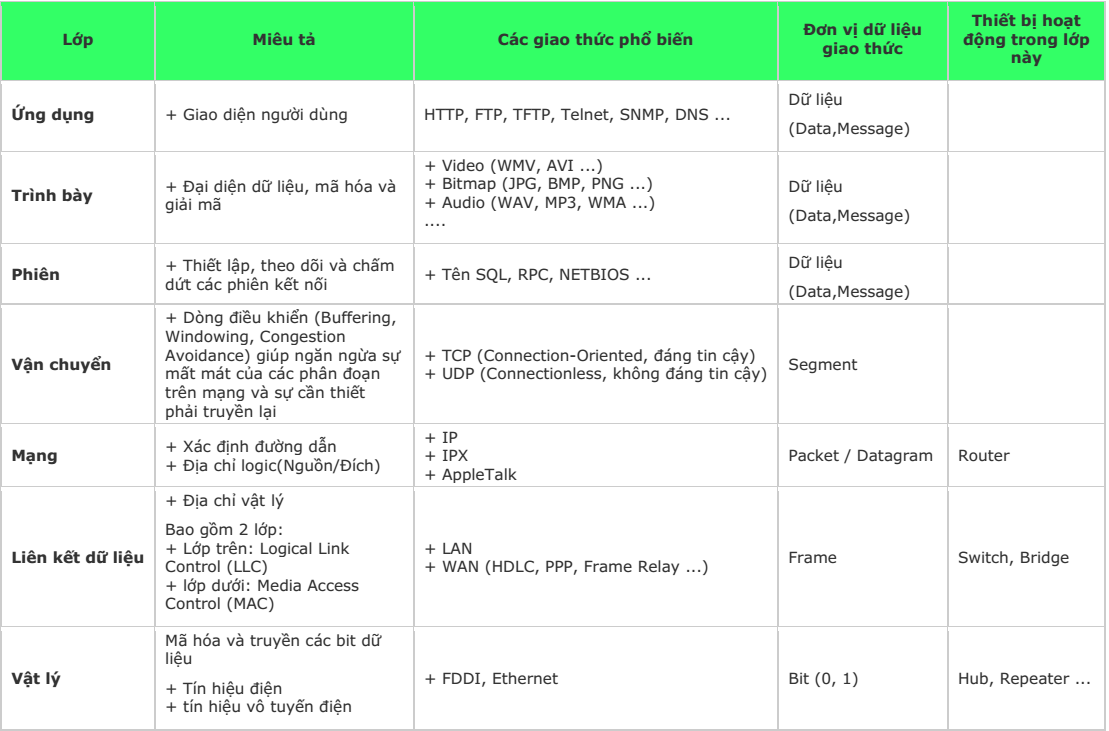
Note: In practice, OSI is just a theoretical model of networking. The actual models used in modern networks are the TCP/IP model. You might think “Well, that’s just theory and has no real-world use! I don’t care”, but trust me, you will use this model much more often than the TCP/IP model so take the time to master it, you will not regret it!
According to: