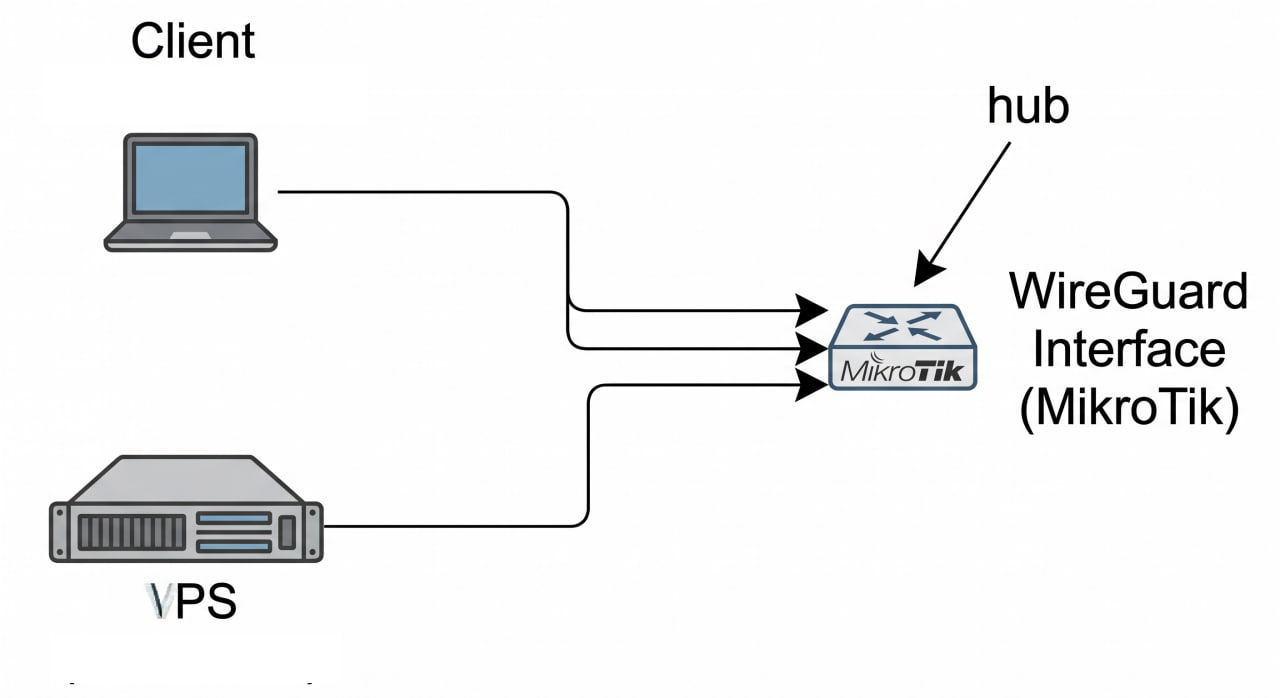
This post summarizes a real debugging and configuration process to make two WireGuard peers ping each other through a MikroTik router acting as the central hub.
Context Topology:
Peer A (Client) (10.10.0.10) --+ +--> WireGuard Interface (MikroTik) <-- hub VPS (10.10.2.1) ---------------+ Environment:
MikroTik router acts as the WireGuard hub, with 10.10.0.1/24 on the WG interface. Peer A (Client) connects to WG with 10.10.0.10/32. VPS connects to WG with 10.
This article explains a setup where a VPS sends traffic through a home Internet connection using WireGuard, while still allowing access between the VPS and the home LAN.
Topology Internet <-> MikroTik (pppoe-out1) - Dynamic home IP via DDNS <-> WireGuard tunnel VPS (203.0.113.10) - wg0: 10.10.2.1/24 <-> LAN 172.16.0.0/24 1. VPS - /etc/wireguard/wg0.conf [Interface] Address = 10.10.2.1/24 ListenPort = 51820 PrivateKey = <private_key_vps> PostUp = iptables -A FORWARD -i %i -j ACCEPT; iptables -t nat -A POSTROUTING -o eth0 -j MASQUERADE; iptables -A FORWARD -o %i -j ACCEPT PostDown = iptables -D FORWARD -i %i -j ACCEPT; iptables -t nat -D POSTROUTING -o eth0 -j MASQUERADE; iptables -D FORWARD -o %i -j ACCEPT [Peer] # MikroTik PublicKey = <public_key_mikrotik> AllowedIPs = 0.
An IP address is a unique identifier code for a computer or network that allows users to send and receive data. Typically, there are four types of IP addresses as follows: static, dynamic, public, private. Currently there are 2 versions of IP which are IPv4 and IPv6, in which IPv4 is the widely used standard with a length of 32 bits, IPv6 is the 128-bit standard.
IPv4 and IPv6 An example of an IPv4 address is as follows: 185.
The OSI (Open Systems Interconnection Reference Model) uses layers to visually describe what is happening with a specific network system.
Basically, the OSI model has the following features:
It makes it easy for us to visualize the big picture of the network and understand how computer networks basically work.
Through the OSI model, we can understand how hardware and software work together.
It helps network administrators narrow down problems when there are network issues by separating layers.
The SkywireX Collection stores images and documents about Skywire. Beautiful images of skyminers and community skyfleet antennas. SkywireX hopes it will be helpful for beginners or when you want to find information again.
Have you ever wondered how the Skywire infrastructure is being built? It is built from ARM processor boards and connected together to form a cluster as shown in the images below.
Xem thêm: